Adding Game Controls
Right now the game starts immediately when the page loads, and there is no way to restart or pause. Let’s add a Start button and a pause toggle. The code is event-driven, so we can do this without changing the rendering code.
Adding the Button to HTML
Update index.html to wrap the score and a button in a HUD (heads-up display) row:
  <div id="game">
-   <div id="score">Score: 0</div>
+   <div id="hud">
+     <span id="score">Score: 0</span>
+     <button id="start-btn">Start</button>
+   </div>
    <div id="board"></div>
  </div>
Styling the HUD
Add styles for the HUD and button in src/style.css. Replace the #score rule and add the new rules:
+ #hud {
+   display: flex;
+   align-items: center;
+   gap: 20px;
+ }

  #score {
    color: #eee;
    font-family: monospace;
    font-size: 1.2rem;
  }

+ #start-btn {
+   padding: 6px 16px;
+   font-family: monospace;
+   font-size: 0.9rem;
+   background: #4caf50;
+   color: #fff;
+   border: none;
+   border-radius: 4px;
+   cursor: pointer;
+ }
+
+ #start-btn:hover {
+   background: #66bb6a;
+ }
Also add a style for the paused state:
#board.paused {
  opacity: 0.7;
}
Updating the Engine
The engine needs three changes: a reset function, a togglePause function, and a modified start that resets before starting. Update src/engine.js:
First, extract the initial snake position into a constant and change the initial state so the game does not auto-start:
+ const INITIAL_SNAKE = [
+   { x: 10, y: 10 },
+   { x: 9, y: 10 },
+   { x: 8, y: 10 },
+ ];

- let snake = [
-   { x: 10, y: 10 },
-   { x: 9, y: 10 },
-   { x: 8, y: 10 },
- ];
- let direction = { x: 1, y: 0 };
- let food = placeFood();
+ let snake = [];
+ let direction = { x: 1, y: 0 };
+ let food = null;
  let score = 0;
  let gameOver = false;
+ let running = false;
  let intervalId = null;
Extract a helper for emitting the state (since we will call it from multiple places):
function emitState() {
  emit("snake:tick", { snake: [...snake], food: { ...food }, gameOver });
}
Update the tick function to use it:
  function tick() {
    update();
-   emit("snake:tick", { snake: [...snake], food: { ...food }, gameOver });
+   emitState();
  }
Also update the collision handler to set running = false:
  if (checkCollision(newHead)) {
    gameOver = true;
+   running = false;
    clearInterval(intervalId);
Add a reset function, and update start to reset first:
function reset() {
  snake = INITIAL_SNAKE.map((seg) => ({ ...seg }));
  direction = { x: 1, y: 0 };
  food = placeFood();
  score = 0;
  gameOver = false;
  running = false;
  clearInterval(intervalId);
}

export function start() {
  reset();
  running = true;
  emit("snake:start");
  emitState();
  intervalId = setInterval(tick, TICK_RATE);
}
The reset function restores all state to its initial values. Notice INITIAL_SNAKE.map((seg) => ({ ...seg })). We shallow-copy each segment so resetting does not mutate the constant.
The start function emits a new snake:start event that the UI can listen for to reset its own state (score display, button text, etc.).
Add pause/resume and an isRunning helper:
export function togglePause() {
  if (gameOver || !running) return;

  if (intervalId) {
    clearInterval(intervalId);
    intervalId = null;
    emit("snake:pause");
  } else {
    intervalId = setInterval(tick, TICK_RATE);
    emit("snake:resume");
  }
}

export function isRunning() {
  return running && !gameOver;
}
The togglePause function stops or restarts the interval and emits snake:pause or snake:resume. The guard at the top prevents pausing when the game is over or has not started.
Updating the UI
In src/ui.js, grab the button element:
  const board = document.getElementById("board");
  const scoreDisplay = document.getElementById("score");
+ const startBtn = document.getElementById("start-btn");
Add listeners for the new events:
document.addEventListener("snake:start", () => {
  scoreDisplay.textContent = "Score: 0";
  board.classList.remove("game-over");
  startBtn.textContent = "Restart";
});

document.addEventListener("snake:die", (e) => {
  board.classList.add("game-over");
  startBtn.textContent = "Play Again";
});

document.addEventListener("snake:pause", () => {
  board.classList.add("paused");
});

document.addEventListener("snake:resume", () => {
  board.classList.remove("paused");
});
Export the button so main.js can attach a click handler:
export { startBtn };
Wiring It Up in Main
Update src/main.js to import the button and the new engine functions:
import "./style.css";
import { startBtn } from "./ui.js";
import { start, setDirection, togglePause, isRunning } from "./engine.js";

startBtn.addEventListener("click", () => {
  start();
});

document.addEventListener("keydown", (e) => {
  if (e.key === " " && isRunning()) {
    togglePause();
    return;
  }

  const directions = {
    ArrowUp: { x: 0, y: -1 },
    ArrowDown: { x: 0, y: 1 },
    ArrowLeft: { x: -1, y: 0 },
    ArrowRight: { x: 1, y: 0 },
  };

  if (directions[e.key]) {
    setDirection(directions[e.key]);
  }
});
Pressing the Space bar toggles pause/resume. The isRunning() guard ensures Space does nothing before the game starts or after it ends.
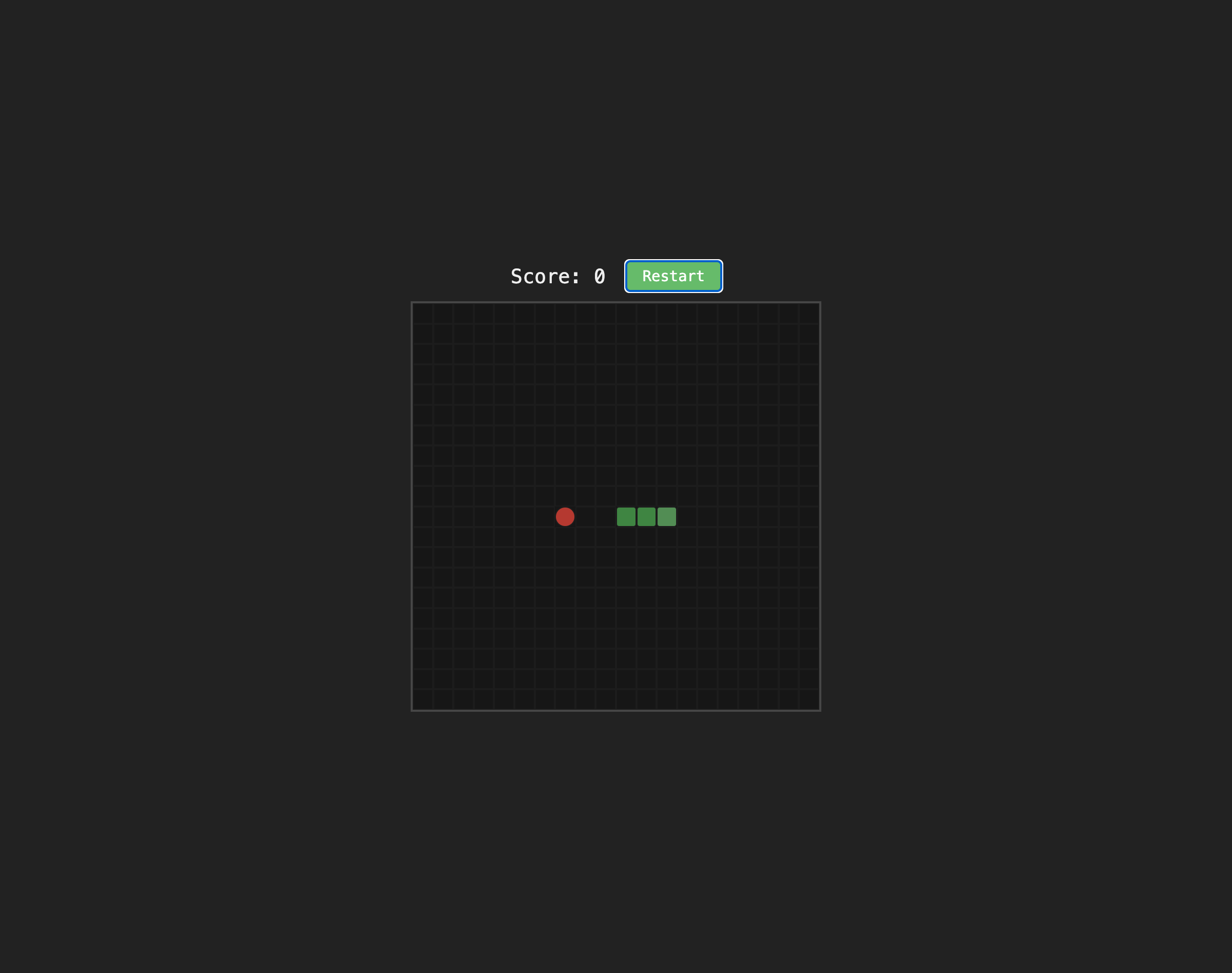
Run the dev server. You should see a “Start” button next to the score. Click it to begin, press Space to pause/resume, and click “Play Again” after a game over to restart:
Checkpoint: Commit your progress.
git add .
git commit -m "snake-10: Add start, restart, and pause controls"
git push