Side Effects with useEffect
The counter works, but say we want to log the count to the console every time it changes. One approach is to add console.log inside each handler.
function increment() {
  setCount(count + 1);
  console.log("count changed to:", count + 1);
}

function decrement() {
  setCount(count - 1);
  console.log("count changed to:", count - 1);
}

function reset() {
  setCount(0);
  console.log("count changed to:", 0);
}
This works, but it is fragile. We had to add console.log to every handler. If we add a new way to change count later, we would have to remember to add logging there too. We want to run this side effect whenever count changes, regardless of why.
The useEffect Hook
React’s useEffect hook lets us do exactly that. Update src/App.jsx:
import "./App.css";
import { useState, useEffect } from "react"; // 👀 Add useEffect
export default function App() {
const [count, setCount] = useState(0);
// 👀 Add this effect
useEffect(() => {
  console.log("count changed to:", count);
}, [count]);
function increment() {
setCount(count + 1);
}
function decrement() {
setCount(count - 1);
}
function reset() {
setCount(0);
}
return (
<div className="counter">
<h1>Count: {count}</h1>
<button onClick={increment}>+</button>
<button onClick={decrement}>−</button>
<button onClick={reset}>Reset</button>
</div>
);
}
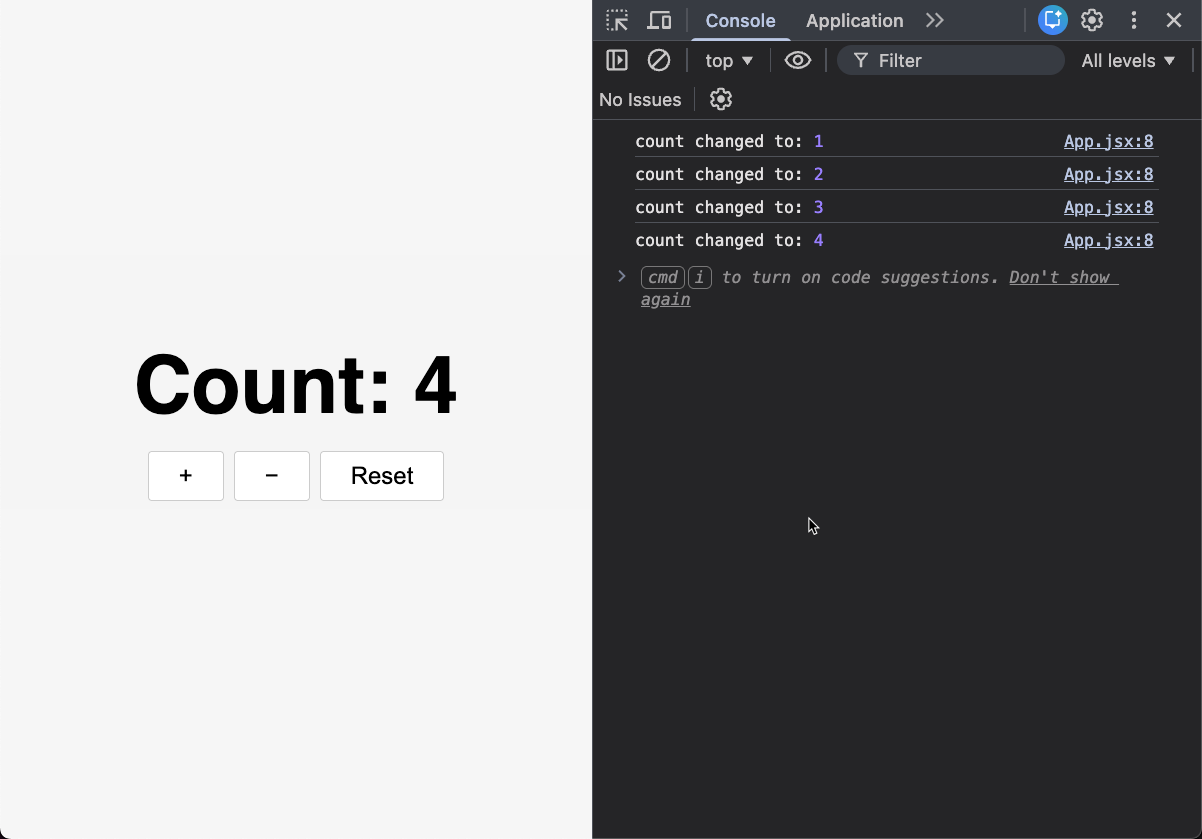
Click the buttons and check the console. The logging happens automatically whenever count changes. The handlers only update state.
How useEffect Works
useEffect(() => {
console.log("count changed to:", count);
}, [count]);
- The first argument is a function (the “effect”) to run
- The second argument
[count]is the dependency array. After a render, React runs the effect when one of these values is different from the previous render
The effect runs once on the initial render and again every time count changes, no matter which handler caused it. (If you see count changed to: 0 twice when the app first loads, that is because React’s StrictMode intentionally runs effects an extra time in development to help catch bugs.)
Checkpoint: Commit your progress.
git add .
git commit -m "counter-07: Add useEffect for side effects"