Authorize Project Deletion
In the previous section we added the first rule on the “writing” side: you must be signed in to create a project or issue. That rule is a check on the principal. We only care whether there is a user, not who they are. In this section we add our first rule that cares about identity. The rule is that only the project’s owner can delete it.
These rules all have the same structure. Load a document, read one of its fields, compare it to the current user’s ID, and throw if they do not match. We are going to write that same structure many times in this chapter. If we write it once in a helper, every guard after this one looks almost identical. So we will write the helper now, along with the first place that uses it.
Write the assertProjectOwner Guard
Open convex/projects.ts and add a new exported function at the top, above the list query:
import {
  query,
  mutation,
  internalMutation,
  type MutationCtx,  // 👀
} from "./_generated/server";
import { ConvexError, v } from "convex/values";  // 👀
import { internal } from "./_generated/api";
import { paginationOptsValidator } from "convex/server";
import { getCurrentUser } from "./users";
import type { Doc, Id } from "./_generated/dataModel";  // 👀

const CASCADE_DELETE_BATCH_SIZE = 100;

/**
 * Guard used by mutations that should only run for a project's owner.
 * Loads the project, asserts the current user owns it, and returns the row
 * so the caller can reuse it without a second `ctx.db.get`.
 */
export async function assertProjectOwner(
  ctx: MutationCtx,
  projectId: Id<"projects">,
): Promise<Doc<"projects">> {
  const user = await getCurrentUser(ctx);
  const project = await ctx.db.get(projectId);
  if (project === null || project.deletedAt !== undefined) {
    throw new ConvexError("Project not found");
  }
  if (project.ownerId !== user._id) {
    throw new ConvexError("Only the project owner can do this");
  }
  return project;
}
A few notes on the design choices here:
getCurrentUseris called inside the guard. We could have passeduserin as an argument instead, but then every caller would have to remember to callgetCurrentUserfirst. Calling it inside the guard means the guard is self-contained. One call from the mutation handler is enough.- The guard returns the project row. Many callers need to read or write the project after the check, and we have already made the
ctx.db.getcall, so returning the row saves them a second lookup. If you do not need it, do not assign the return value. - We treat soft-deleted projects as “not found.” The
deletedAt !== undefinedcheck makes sure a project that has been soft-deleted cannot be interacted with, even by its owner. From the UI’s perspective the project is gone, and the guard matches that. The record is still in the database for now. The cron job from the previous chapter deletes it later. - Error messages are intentionally terse. “Project not found” and “Only the project owner can do this” do not tell you who the actual owner is, and they do not tell you whether the project exists and you are not the owner or the project was deleted. This does not matter much for a personal issue tracker, but it is a good habit.
- The guard is exported. We need it in
issues.ts, where status changes also require the caller to be the project owner.
Use the Guard in remove
With the guard in place, remove is short:
export const remove = mutation({
  args: {
    id: v.id("projects"),
  },
  handler: async (ctx, args) => {
    await assertProjectOwner(ctx, args.id);  // 👀
    await ctx.db.patch(args.id, { deletedAt: Date.now() });
  },
});
This mutation does its work with two helpers. assertProjectOwner checks permissions and loads the project, and ctx.db.patch does the soft-delete. The guard handles the rule, and the patch handles the action.
We do not need the return value of assertProjectOwner here, so we ignore it. That is fine. What we want from the guard here is that it throws when the check fails.
Hide the Trash Icon From Non-Owners
On the frontend, the trash icon currently renders on every project card regardless of who you are. Update src/components/project-card.tsx to fetch the current user and only render the delete dialog when the card belongs to them:
-
Add these imports at the top:
import { useQuery } from "convex/react"; import { api } from "../../convex/_generated/api"; -
Inside the
ProjectCardcomponent, add:const currentUser = useQuery(api.users.currentUser); const isOwner = currentUser?._id === project.ownerId; -
Then wrap the delete dialog in a conditional:
{
  isOwner && (
    <DeleteProjectDialog
      projectId={project._id}
      projectName={project.name}
    />
  );
}
The currentUser query returns undefined briefly while it loads, then either the user document or null if you are signed out. The optional chain currentUser?._id === project.ownerId handles all three states. While the query is loading, isOwner is false and nothing renders. Once the user loads, isOwner is true only if the IDs match.
Try It Out
As the owner:
Sign in. Every project card on the home page shows a red trash icon, because all 50 projects are the ones you seeded and you own them. Click the icon on any card, confirm the dialog, and the card disappears from the list, because projects.list filters out soft-deleted rows.
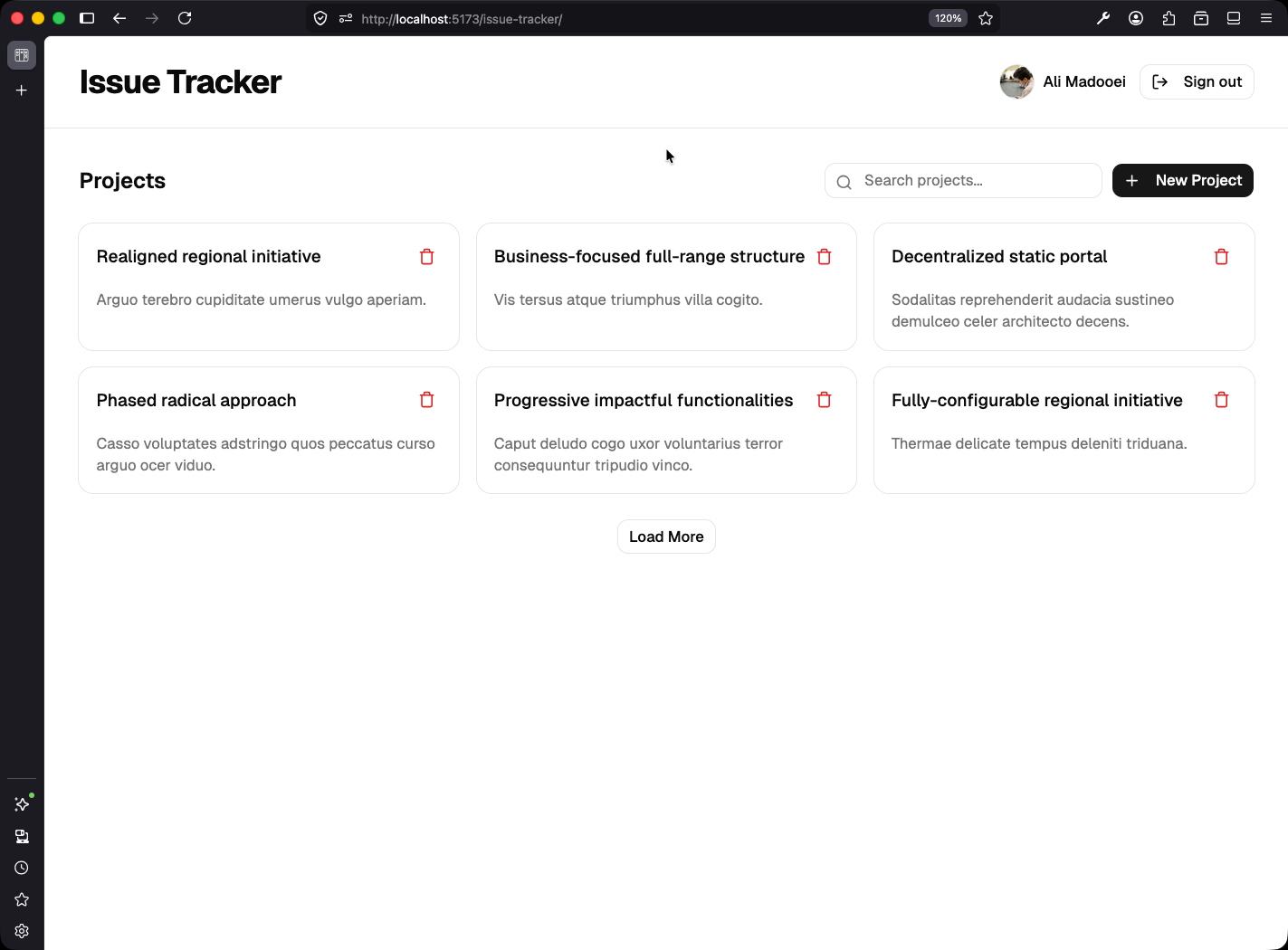
As an anonymous visitor:
Sign out. The same cards are still visible, because you can still read projects while signed out, but every trash icon is gone. No card on the page is yours, and the UI shows that.
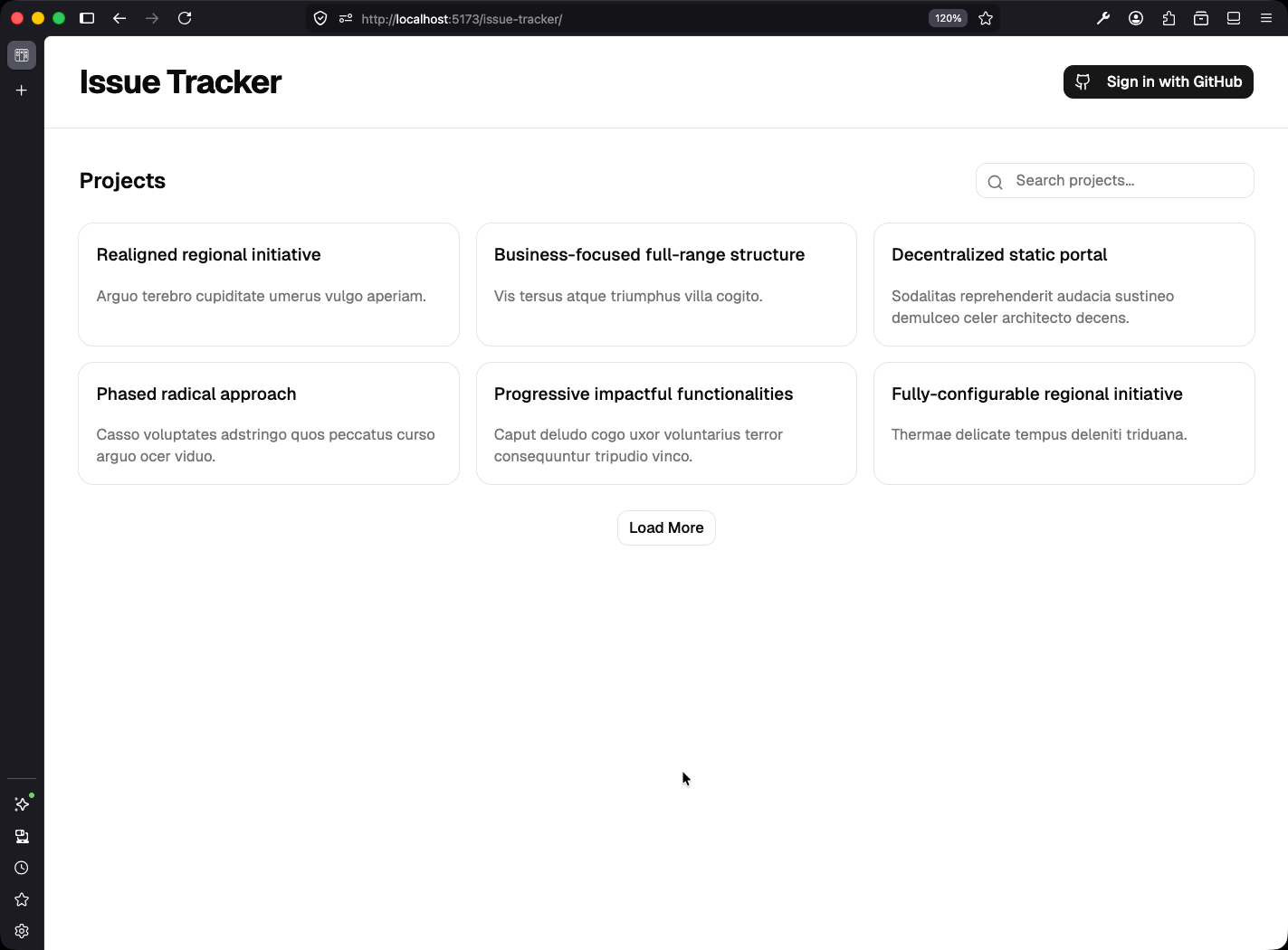
Checkpoint: Commit your progress.
git add .
git commit -m "tracker-09: Authorize project deletion via assertProjectOwner"
git push