Seed the Database
Throughout this chapter, you have been creating projects and tasks by hand through the UI. That works for quick testing, but what if you want to test with a realistic amount of data, say, three projects with several tasks each? Clicking through the UI dozens of times is not practical.
Database seeding is populating the database with sample data using a script. Seeding is common during development and testing. Most backend frameworks have a built-in way to do it.
The Seed Data
Create a file called seed-data.json in the project root with sample projects and tasks:
{
  "projects": [
    {
      "name": "Website Redesign",
      "description": "Modernize the company website with a fresh look.",
      "tasks": [
        {
          "title": "Audit existing pages",
          "description": "Review all current pages for outdated content",
          "status": "done"
        },
        {
          "title": "Create wireframes",
          "description": "Design wireframes for the new homepage",
          "status": "done"
        },
        {
          "title": "Choose color palette",
          "description": "Pick brand-aligned colors for the redesign",
          "status": "in-progress"
        },
        {
          "title": "Build navigation component",
          "description": "Implement the responsive top nav bar",
          "status": "todo"
        },
        {
          "title": "Write homepage copy",
          "description": "Draft the hero section and feature highlights",
          "status": "todo"
        }
      ]
    },
    {
      "name": "Mobile App Launch",
      "description": "Ship the first version of our mobile app.",
      "tasks": [
        {
          "title": "Set up React Native project",
          "description": "Initialize the project with Expo",
          "status": "done"
        },
        {
          "title": "Design onboarding flow",
          "description": "Create screens for first-time users",
          "status": "in-progress"
        },
        {
          "title": "Implement push notifications",
          "description": "Set up Firebase Cloud Messaging",
          "status": "in-progress"
        },
        {
          "title": "Build user profile screen",
          "description": "Display and edit user information",
          "status": "todo"
        },
        {
          "title": "Test on Android and iOS",
          "description": "Run manual QA on both platforms",
          "status": "todo"
        },
        {
          "title": "Submit to app stores",
          "description": "Prepare screenshots and descriptions",
          "status": "todo"
        }
      ]
    },
    {
      "name": "API Integration",
      "description": "Connect our platform with third-party services.",
      "tasks": [
        {
          "title": "Research payment providers",
          "description": "Compare Stripe, Square, and PayPal",
          "status": "done"
        },
        {
          "title": "Implement OAuth flow",
          "description": "Add Google and GitHub login support",
          "status": "done"
        },
        {
          "title": "Build webhook handler",
          "description": "Process incoming events from partners",
          "status": "in-progress"
        },
        {
          "title": "Write API documentation",
          "description": "Document all public endpoints",
          "status": "todo"
        },
        {
          "title": "Add rate limiting",
          "description": "Protect endpoints from abuse",
          "status": "todo"
        }
      ]
    }
  ]
}
The data is in a plain JSON file, separate from the Convex code. Each project has a name, description, and an array of tasks with explicit statuses.
The Seed Mutation
Create convex/seed.ts:
import { v } from "convex/values";
import { internalMutation } from "./_generated/server";

export const insertSeedData = internalMutation({
  args: {
    projects: v.array(
      v.object({
        name: v.string(),
        description: v.optional(v.string()),
        tasks: v.array(
          v.object({
            title: v.string(),
            description: v.string(),
            status: v.union(
              v.literal("todo"),
              v.literal("in-progress"),
              v.literal("done"),
            ),
          }),
        ),
      }),
    ),
  },
  handler: async (ctx, args) => {
    for (const project of args.projects) {
      const projectId = await ctx.db.insert("projects", {
        name: project.name,
        description: project.description,
      });

      for (const task of project.tasks) {
        await ctx.db.insert("tasks", {
          projectId,
          title: task.title,
          description: task.description,
          status: task.status,
        });
      }
    }
  },
});
This internal mutation accepts a projects array as an argument, creates each project, and inserts its tasks with the correct projectId linking them together.
Run the Seed
Make sure npx convex dev is running. Then, in a separate terminal, run:
npx convex run seed:insertSeedData "$(cat seed-data.json)"
Let’s go through this command piece by piece:
npx convex run— executes a Convex function from the command lineseed:insertSeedData— the function to run, in the formatfile:functionName"$(cat seed-data.json)"— shell substitution reads the JSON file and passes its contents as the function’s arguments
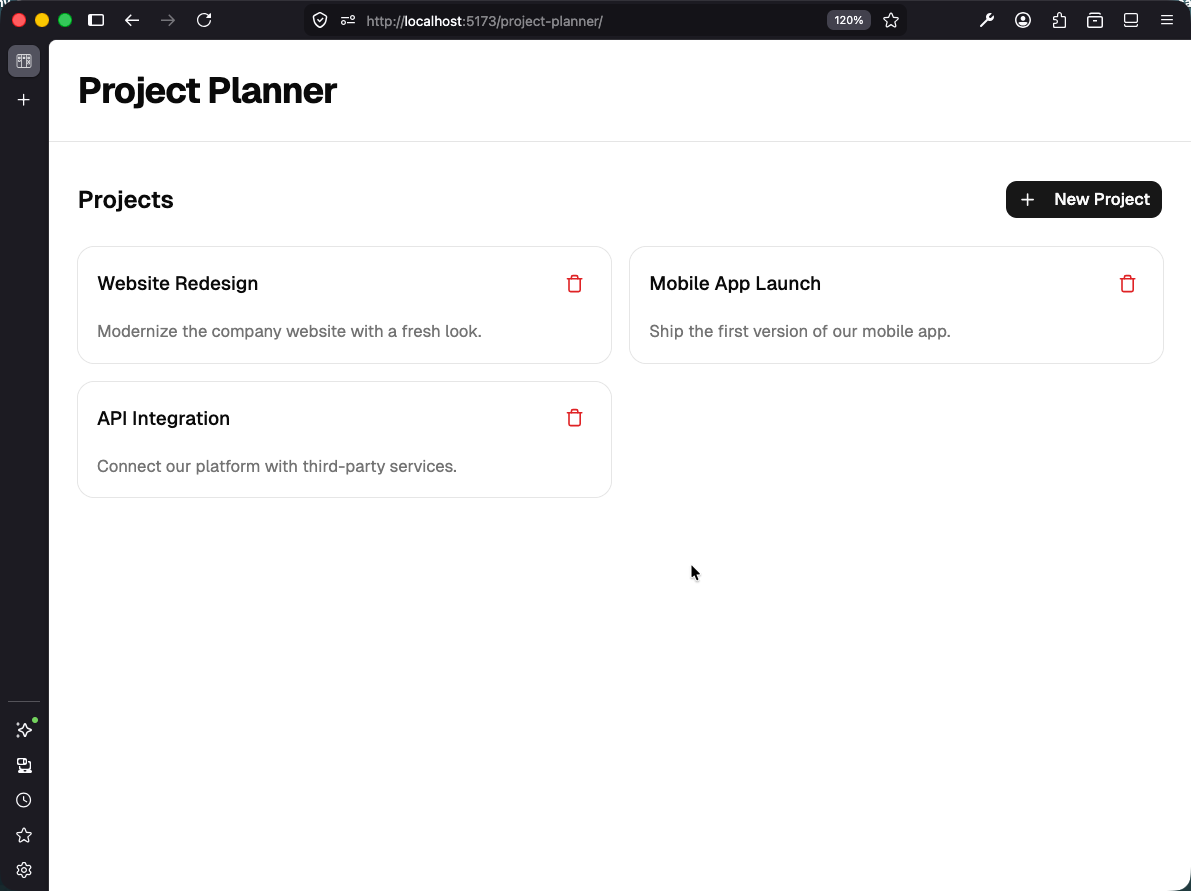
Open your app in the browser. You should see three projects, each with tasks distributed across the three status columns.
Checkpoint: Commit your progress.
git add .
git commit -m "planner-13: Add seed script with sample projects and tasks"
git push