Write Mutations
We can read tasks from Convex. Now we will write to it. Mutations are server functions that modify the database. They are the Convex equivalent of POST, PUT, and DELETE endpoints in a REST API.
Add Mutations to convex/tasks.ts
Update convex/tasks.ts to add three mutations alongside the existing query:
import { query, mutation } from "./_generated/server";
import { v } from "convex/values";

export const list = query({
  args: {},
  handler: async (ctx) => {
    return await ctx.db.query("tasks").collect();
  },
});

export const create = mutation({
  args: {
    title: v.string(),
    description: v.string(),
  },
  handler: async (ctx, args) => {
    await ctx.db.insert("tasks", {
      title: args.title,
      description: args.description,
      status: "todo",
    });
  },
});

export const updateStatus = mutation({
  args: {
    id: v.id("tasks"),
    status: v.union(
      v.literal("todo"),
      v.literal("in-progress"),
      v.literal("done"),
    ),
  },
  handler: async (ctx, args) => {
    await ctx.db.patch(args.id, { status: args.status });
  },
});

export const remove = mutation({
  args: {
    id: v.id("tasks"),
  },
  handler: async (ctx, args) => {
    await ctx.db.delete(args.id);
  },
});
Notice the import of mutation from ./_generated/server. This is the constructor function for mutations, similar to how we imported query for our query. Each mutation is defined with args and a handler, just like queries. The key difference is that mutations modify data while queries only read data.
The v import is the validator builder, which we use to define the shape of our arguments. We used the same validators in our schema, but here we are defining the shape of the function arguments instead of database fields.
Let’s walk through each mutation:
create
export const create = mutation({
  args: {
    title: v.string(),
    description: v.string(),
  },
  handler: async (ctx, args) => {
    await ctx.db.insert("tasks", {
      title: args.title,
      description: args.description,
      status: "todo",
    });
  },
});
argsdefines what the client must pass. Convex validates these at runtime, so if the client sends a number instead of a string, the mutation fails with a clear error.ctx.db.insert("tasks", {...})creates a new document in thetaskstable. We hardcodestatus: "todo"because new tasks always start in the To Do column.- Convex automatically adds
_idand_creationTime. We do not need to generate an ID or timestamp.
updateStatus
export const updateStatus = mutation({
  args: {
    id: v.id("tasks"),
    status: v.union(
      v.literal("todo"),
      v.literal("in-progress"),
      v.literal("done"),
    ),
  },
  handler: async (ctx, args) => {
    await ctx.db.patch(args.id, { status: args.status });
  },
});
v.id("tasks")is a special validator for document IDs. It ensures the argument is a valid ID that references thetaskstable.ctx.db.patch(id, fields)updates only the specified fields on an existing document. It is like a partial update. The rest of the document stays unchanged.
remove
export const remove = mutation({
  args: {
    id: v.id("tasks"),
  },
  handler: async (ctx, args) => {
    await ctx.db.delete(args.id);
  },
});
ctx.db.delete(id)removes the document from the table.- We name the function
removeinstead ofdeletebecausedeleteis a reserved word in JavaScript.
Mutations Are Transactional
Every mutation runs as an atomic transaction. If anything goes wrong (a validation error, a bug in your code), the entire mutation rolls back, so there are no partial writes. With a traditional database, you would normally have to set this up manually.
Test in the Dashboard
If npx convex dev is running, the mutations are already deployed. Open the Convex dashboard, go to your project’s “Functions” tab, and you should see tasks:create, tasks:updateStatus, and tasks:remove alongside tasks:list.
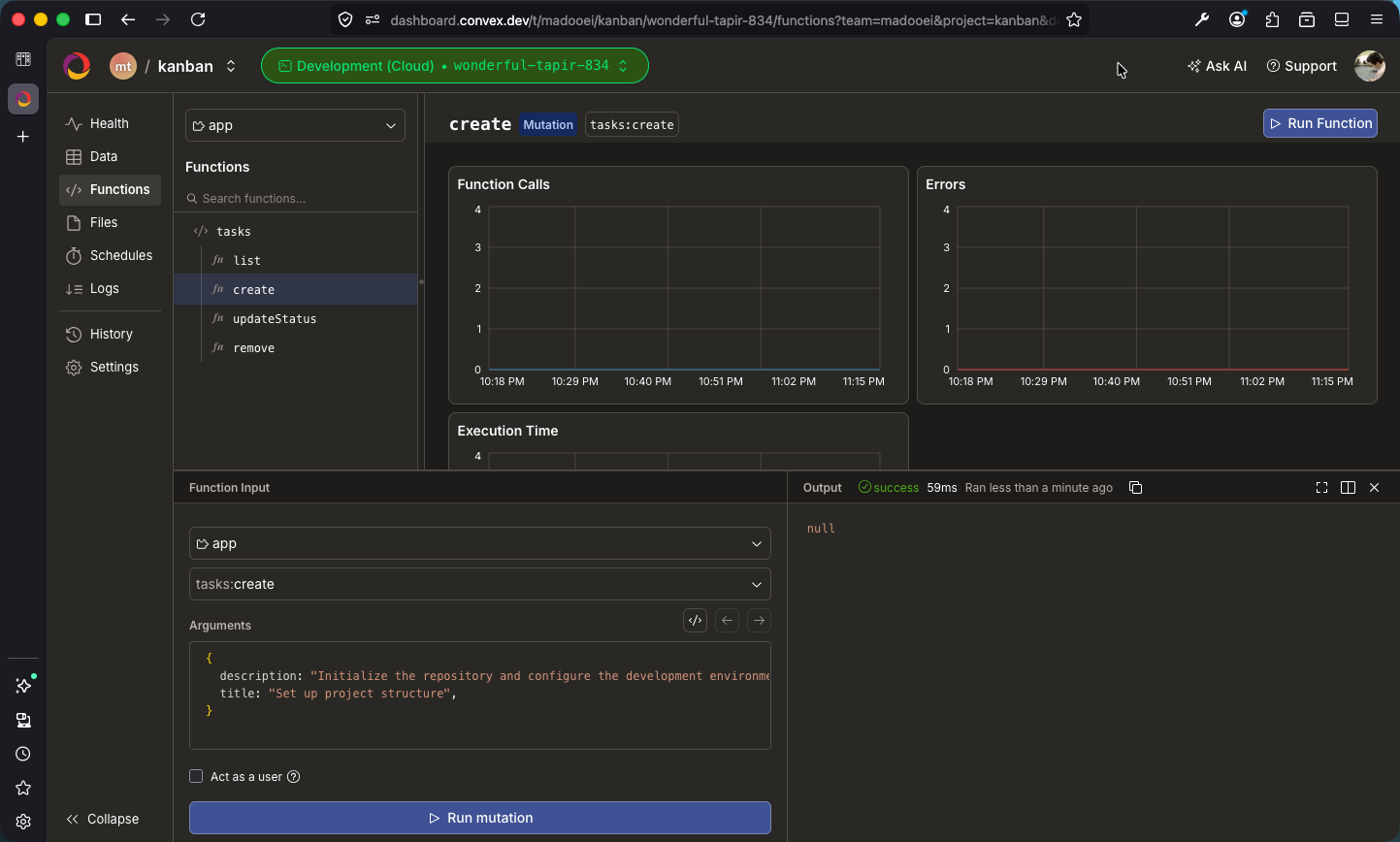
You can test tasks:create directly from the dashboard by providing arguments. Try creating a task, then check the “Data” tab to see it in the tasks table. If you run tasks:list, you will see it returned.
Checkpoint: Commit your progress.
git add .
git commit -m "kanban-07: Write mutations for create, updateStatus, and remove"
git push