Event Handlers
The counter looks right, but the buttons do not do anything yet. Let’s add event handlers.
Adding onClick Handlers
In React, we attach event handlers directly in JSX using onClick (camelCase, not onclick). We attach the handler right on the button, so we do not need to look up the element with getElementById.
Update src/App.jsx:
import "./App.css";

export default function App() {
  let count = 0;

  function increment() {
    count = count + 1;
    console.log("count is now:", count);
  }

  function decrement() {
    count = count - 1;
    console.log("count is now:", count);
  }

  function reset() {
    count = 0;
    console.log("count is now:", count);
  }

  return (
    <div className="counter">
      <h1>Count: {count}</h1>
      <button onClick={increment}>+</button>
      <button onClick={decrement}>−</button>
      <button onClick={reset}>Reset</button>
    </div>
  );
}
We changed count from const to let so we can reassign it, and added console.log to each handler so we can verify the variable is changing.
The UI Does not Update
Click the buttons and open the browser console. The count variable is changing. But the UI still shows 0.
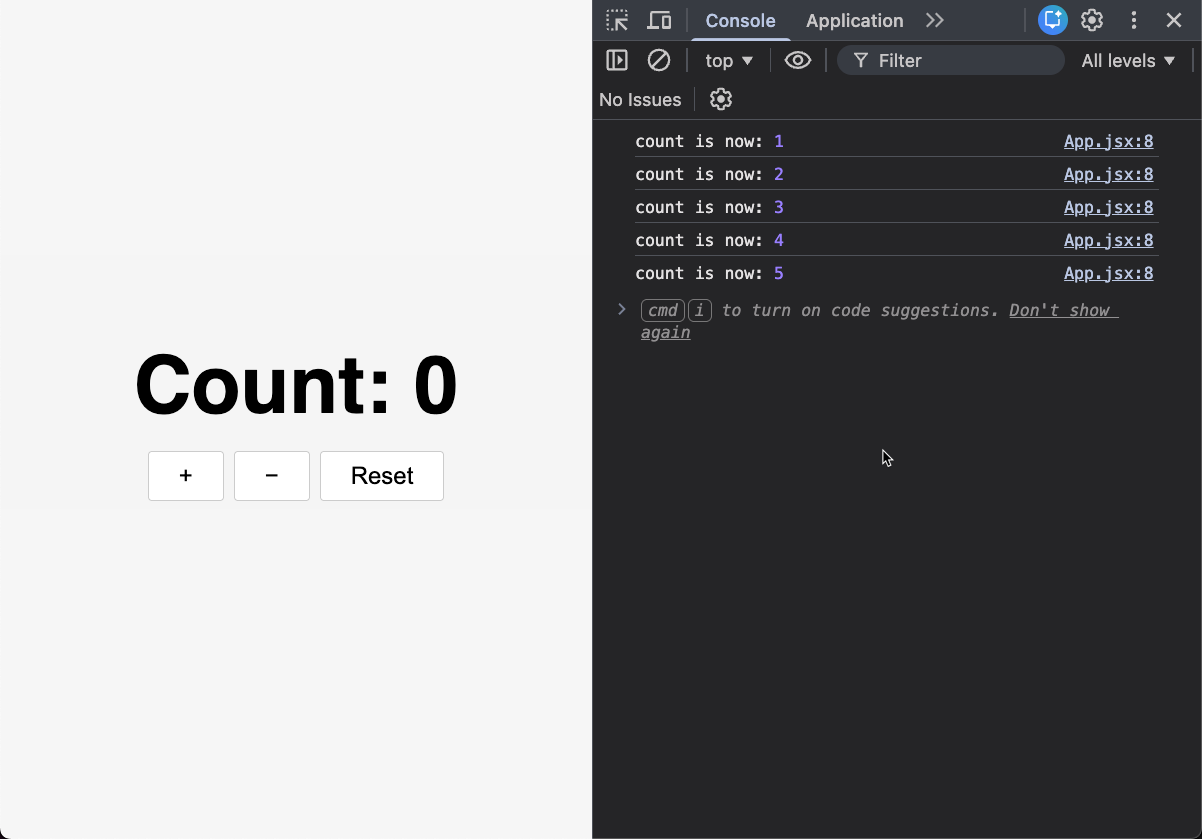
The problem is that React does not detect that the variable changed. In vanilla JS, we manually called updateCounter() after every change. But in React, the component function already ran and returned its JSX. Changing a local variable does not cause React to re-run the function.
We need a way to tell React that the data changed so it re-renders.
Checkpoint: Commit your progress.
git add .
git commit -m "counter-05: Add event handlers (UI doesn't update yet)"