Write Your First Query
The schema is in place, so let’s write our first server-side function. It is a query that reads all tasks from the database.
Create the Query
Create convex/tasks.ts:
import { query } from "./_generated/server";

export const list = query({
  args: {},
  handler: async (ctx) => {
    return await ctx.db.query("tasks").collect();
  },
});
Let’s break it down:
-
The main line is
ctx.db.query("tasks").collect(). This is how you read data from the Convex database.ctx.dbis your interface to the database,query("tasks")starts a query on thetaskstable, and.collect()executes the query and returns all matching documents as an array. This line reads all documents from thetaskstable and returns them as an array. -
The
ctx(context) object is passed to every query and mutation handler. It containsctx.dbfor database access, as well as other properties and methods for things like authentication, calling other functions, and more. -
It looks like we import
queryand export it. But actually,queryis a constructor function that takes an object (withargsandhandlerproperties) and returns a new function that Convex registers as a query. -
Notice the
queryfunction is imported from./_generated/server. This is a special file that Convex generates for you based on your schema. It contains typed constructors likequeryandmutationthat you use to define your backend functions. -
The
querytakes an object with two properties:args: the arguments this function accepts. Ours takes none, so it is an empty object. We could have, for example, definedargs: { status: string }if we wanted to filter tasks by status.handler: the async function that runs on the server. Here you write the logic to read from the database and return data. In our case, it just returns all tasks. But you could write more complex logic here. For example, you could read from multiple tables, perform calculations, or call other functions.
-
Notice what we export is a variable named
list. The export name matters. Combined with the file name, this becomesapi.tasks.list. This is the way you will call this function from your React code. The pattern isapi.<filename>.<exportName>.
Queries Are Reactive
Convex queries are reactive subscriptions. When you call this query from the client (which we will do in the next section), Convex:
- Runs the query and returns the results
- Tracks which data the query read
- Whenever that data changes (because a mutation modified the
taskstable), Convex re-runs the query and pushes the new results to every connected client
This is how Convex gives you real-time updates. You do not write any subscription code. You write a query, and Convex handles the reactivity for you.
Other Query Methods
The ctx.db.query() API has several methods for refining your query. Here are the most common ones:
.collect()— return all matching documents as an array.first()— return the first matching document (ornull).filter((q) => q.eq(q.field("status"), "todo"))— filter documents by a condition.order("desc")— sort by_creationTimein descending order.take(10)— return at most 10 documents
We will use some of these later. For now, .collect() gives us everything, which is what we need.
Verify in the Dashboard
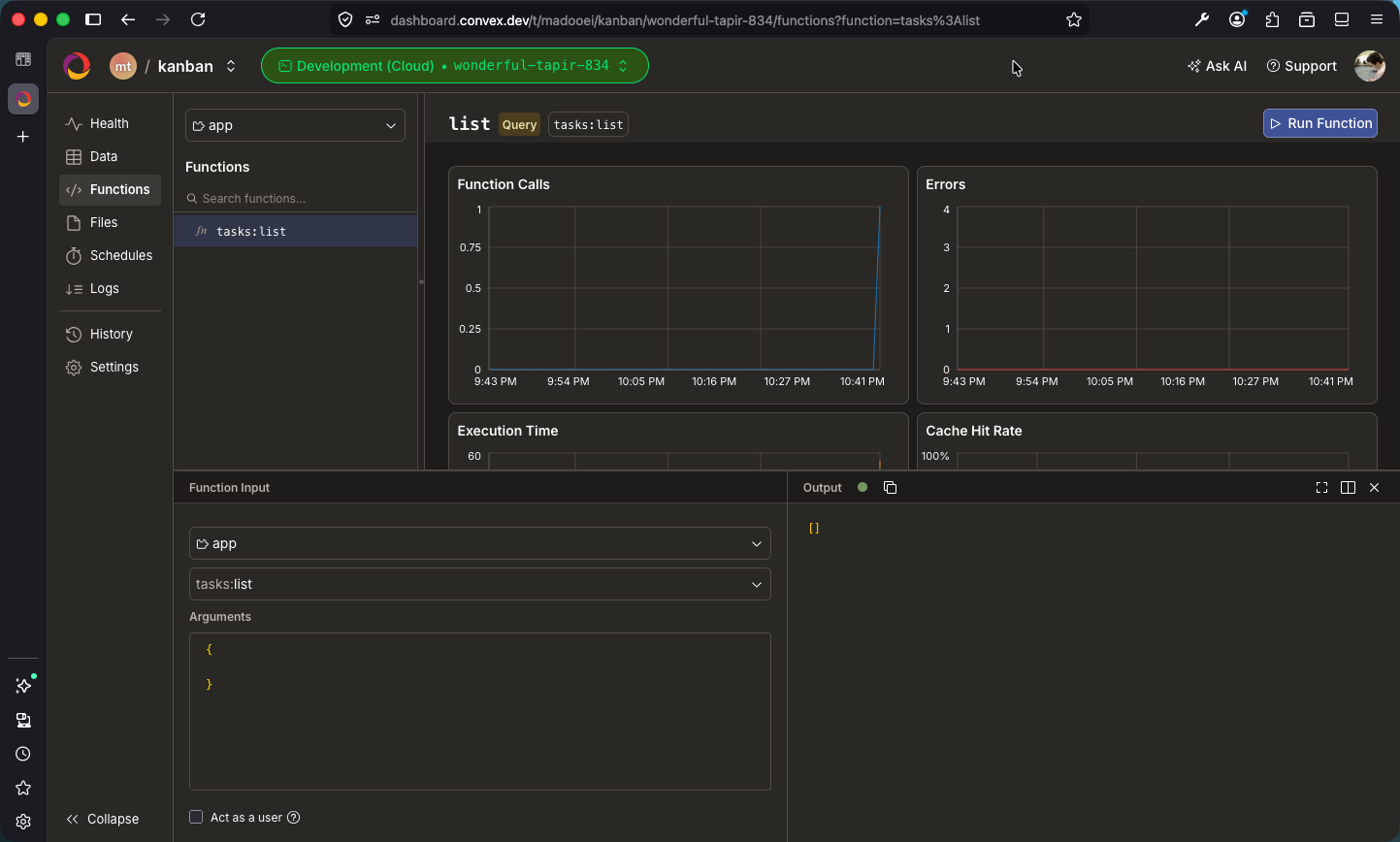
Run npx convex dev if it is not already running. Convex automatically detects the new file and deploys your query. Open the Convex dashboard, navigate to your project, and you should see the tasks:list function listed under “Functions.” You can even run it from there. It will return an empty array since we have not added any data yet.
Checkpoint: Commit your progress.
git add .
git commit -m "kanban-04: Write the list query"
git push