Managing State with useReducer
Our board page uses useState to manage the kudos list. That works, but as state logic grows (adding kudos, deleting kudos, maybe editing them later), spreading that logic across multiple handler functions gets messy. React provides useReducer as an alternative that centralizes state updates in one place.
useState vs. useReducer
With useState, state updates are scattered across your component:
// Adding
setKudos((prev) => [...prev, newKudo]);

// Deleting (if we had it)
setKudos((prev) => prev.filter((k) => k.id !== id));

// Editing (if we had it)
setKudos((prev) => prev.map((k) => (k.id === id ? { ...k, ...changes } : k)));
With useReducer, all state transitions live in a single reducer function. Instead of directly setting state, you dispatch actions, which are plain objects that describe what happened. The reducer decides how to update the state based on the action:
dispatch({ type: "added", kudo: newKudo });
dispatch({ type: "deleted", id: "k1" });
This pattern makes state logic easier to read, test, and extend.
Define the action types and reducer
Create src/reducers/kudos.ts:
import type { Kudo } from "@/data/types";

type KudoAction =
  | { type: "added"; kudo: Kudo }
  | { type: "deleted"; id: string };

function assertNever(value: never): never {
  throw new Error(`Unexpected action: ${JSON.stringify(value)}`);
}

export function kudosReducer(kudos: Kudo[], action: KudoAction): Kudo[] {
  switch (action.type) {
    case "added":
      return [...kudos, action.kudo];
    case "deleted":
      return kudos.filter((k) => k.id !== action.id);
  }

  return assertNever(action);
}
The KudoAction type is a discriminated union — TypeScript knows that when type is "added", the action will have a kudo property, and when type is "deleted", it will have an id property. This makes the reducer fully type-safe.
The assertNever function is a safety check. It should never run, because the switch already handles every valid action type. But if you later add a new action to KudoAction and forget to add a matching case, TypeScript will flag action as no longer being never at the bottom of the function. That is a compile-time signal to update the reducer so it matches the action type.
The reducer itself is a pure function. You give it the current state and an action, and it returns a new state. It does not perform side effects and it does not mutate the state it was given.
Update KudoCard with a delete button
Before we update the board page to use useReducer, let’s add a delete button to each kudo card. While we are at it, let’s move this component into its own file to keep things organized. Create src/components/kudo-card.tsx:
import type { Kudo } from "@/data/types";
import { Card, CardContent } from "@/components/ui/card";
import { Trash2 } from "lucide-react";

type KudoCardProps = {
  kudo: Kudo;
  onDelete: () => void;
};

function KudoCard({ kudo, onDelete }: KudoCardProps) {
  return (
    <Card className={kudo.color}>
      <CardContent className="relative pt-1">
        <button
          onClick={onDelete}
          className="absolute top-0 right-3 rounded p-0 text-muted-foreground hover:text-destructive"
          aria-label={`Delete kudo from ${kudo.author}`}
        >
          <Trash2 className="h-4 w-4" />
        </button>
        <p className="mb-3 text-sm">{kudo.message}</p>
        <p className="text-xs font-semibold text-muted-foreground">
          — {kudo.author}
        </p>
      </CardContent>
    </Card>
  );
}

export default KudoCard;
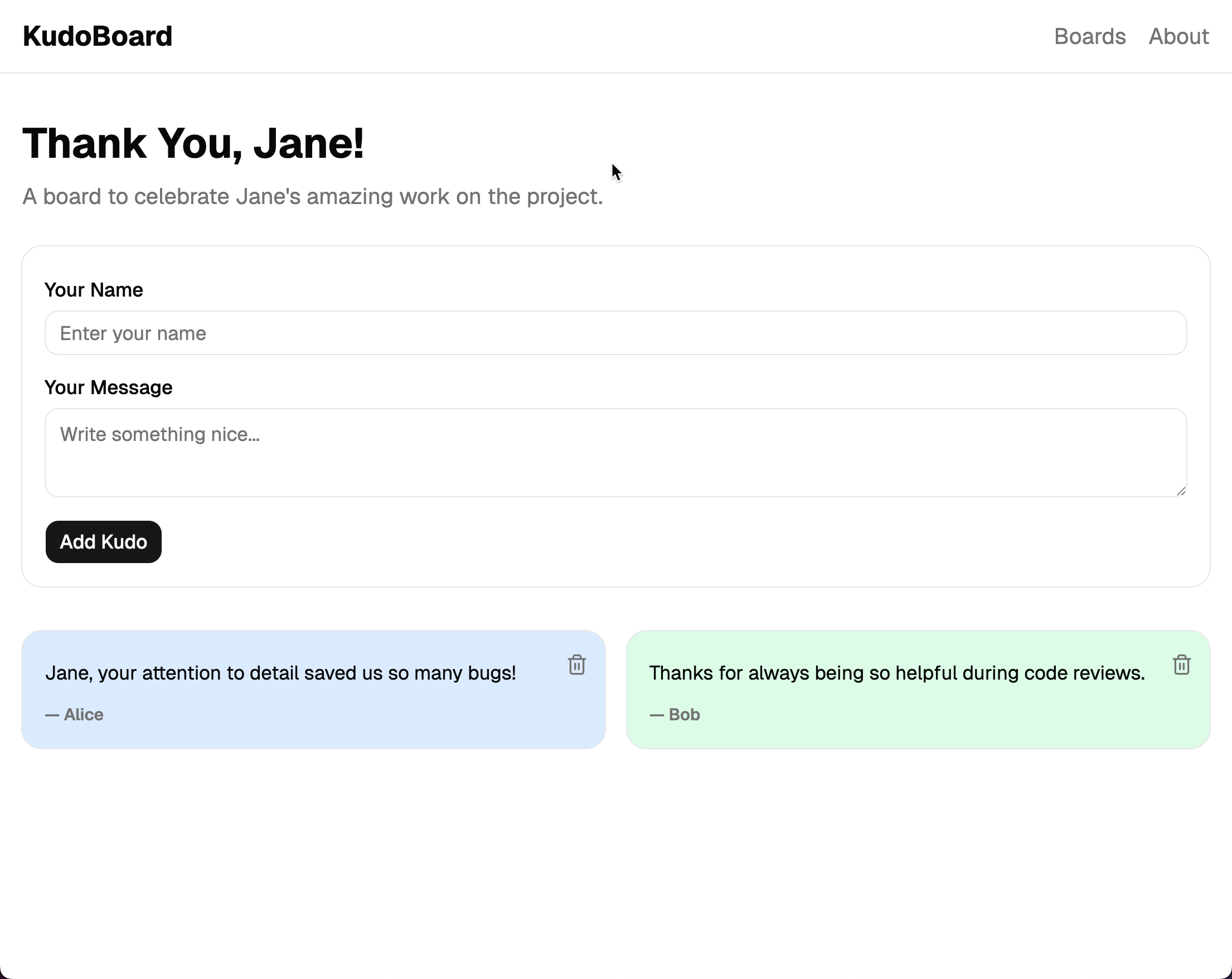
The delete button is positioned in the top-right corner of the card. When clicked, it calls the onDelete callback passed from the parent.
Update BoardPage to use useReducer
Update src/routes/boards.$boardId.tsx:
import { createFileRoute } from "@tanstack/react-router";
import { INITIAL_BOARDS } from "@/data/boards";
import type { Kudo } from "@/data/types";
import { useReducer } from "react"; // 👀
import AddKudoForm from "@/components/add-kudo-form";
import KudoCard from "@/components/kudo-card"; // 👀
import { kudosReducer } from "@/reducers/kudos"; // 👀

export const Route = createFileRoute("/boards/$boardId")({
  component: BoardPage,
});

function BoardPage() {
  const { boardId } = Route.useParams();
  const board = INITIAL_BOARDS.find((b) => b.id === boardId);

  const [kudos, dispatch] = useReducer(kudosReducer, board?.kudos ?? []); // 👀

  if (!board) {
    return (
      <div className="text-center">
        <h1 className="mb-2 text-2xl font-bold">Board not found</h1>
        <p className="text-muted-foreground">
          The board you're looking for doesn't exist.
        </p>
      </div>
    );
  }

  function handleAddKudo(kudo: Kudo) {
    dispatch({ type: "added", kudo }); // 👀 Dispatch instead of setState
  }

  function handleDeleteKudo(id: string) {
    dispatch({ type: "deleted", id }); // 👀 New: delete action
  }

  return (
    <div>
      <h1 className="mb-2 text-3xl font-bold">{board.title}</h1>
      <p className="mb-6 text-muted-foreground">{board.description}</p>
      <AddKudoForm onAdd={handleAddKudo} />

      {kudos.length === 0 ? (
        <p className="text-muted-foreground">
          No kudos yet. Be the first to add one!
        </p>
      ) : (
        <div className="grid gap-4 sm:grid-cols-2 lg:grid-cols-3">
          {kudos.map((kudo) => (
            <KudoCard
              key={kudo.id}
              kudo={kudo}
              onDelete={() => handleDeleteKudo(kudo.id)} // 👀
            />
          ))}
        </div>
      )}
    </div>
  );
}
The useReducer hook takes the reducer function and an initial state value. It returns the current state and a dispatch function. Calling dispatch({ type: "added", kudo }) sends the action to the reducer, which returns the new state, and React re-renders.
The AddKudoForm component stays exactly the same. It does not care whether the parent uses useState or useReducer. It just calls onAdd with a new kudo.
Notice we also added a handleDeleteKudo function that dispatches a “deleted” action with the kudo’s ID.
Run the app and try adding and deleting kudos. The behavior is the same as before, but the state logic is now centralized in the reducer.
Checkpoint: Commit your progress.
git add .
git commit -m "kudoboard-09: Refactor BoardPage to use useReducer for managing kudos state and add delete functionality"
git push