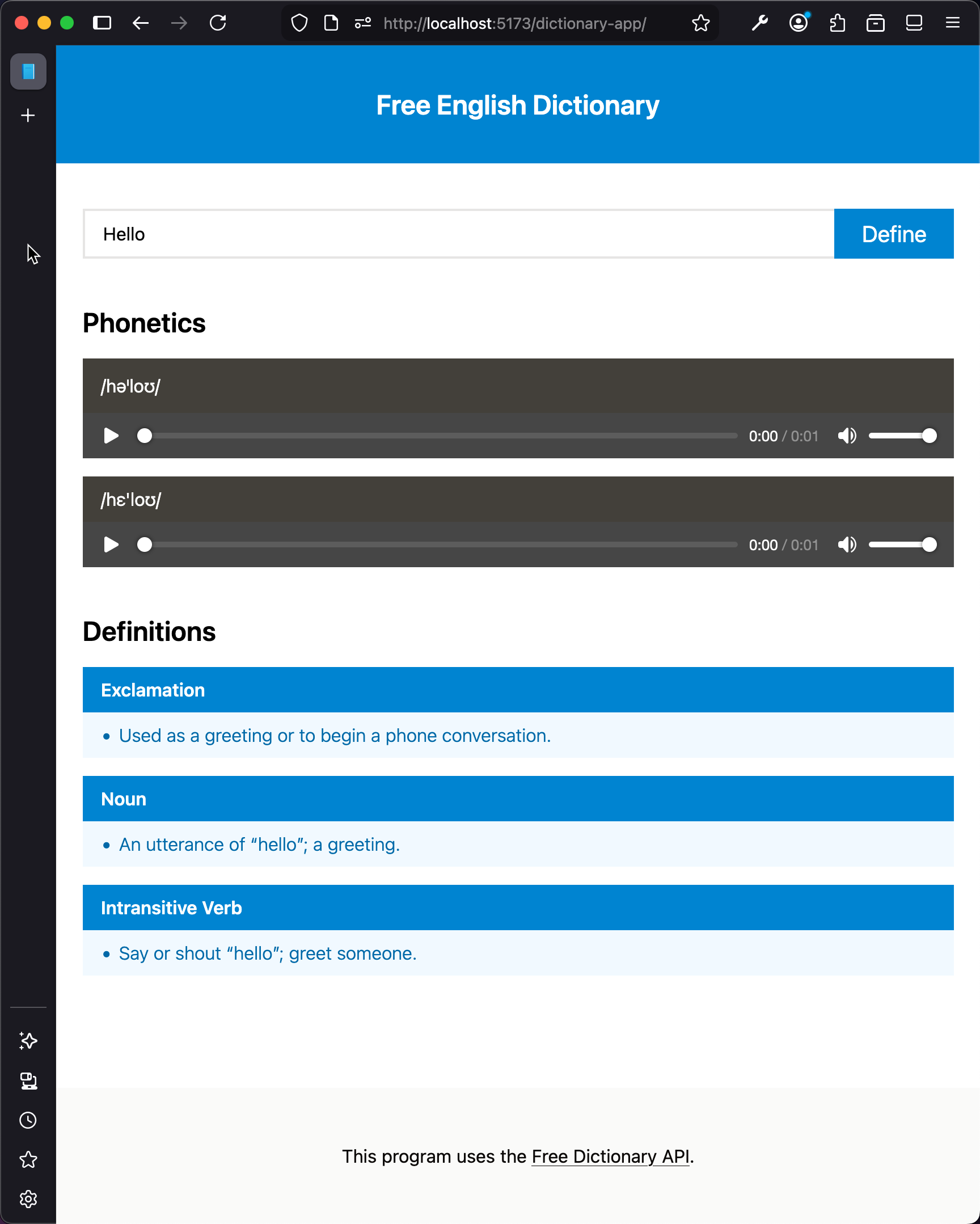
Explore the Layout
Open the index.html file. Notice the body contains three main sections: header, main, and footer. The header contains the title of our app. The main section contains the search input, phonetics, and definitions. The footer contains the credits.
The Header
This is the HTML code for the header:
<!--Header-->
<header class="bg-sky-600 py-9">
  <p class="text-2xl font-semibold text-center text-white">
    Free English Dictionary
  </p>
</header>
Here is what each class does:
bg-sky-600for theheaderto set the background color to a sky blue.py-9for theheaderto add vertical padding.text-center,text-white,text-2xl,font-semiboldfor theptag to adjust the text styling and alignment.
The Main Section
<!--Main Section-->
<main class="container flex flex-col flex-grow gap-4 mx-auto my-4">
  <!-- Subsections not shown -->
</main>
The main section is centered on the page, and it puts a gap between its children.
Search Input
Within the main section, there is a section for the search functionality:
<!--Search-->
<section class="flex items-center justify-center py-6">
  <div class="flex-grow">
    <input
      class="w-full px-4 py-2 border-2 border-r-0 border-stone-200"
      id="input"
      placeholder="Enter a word"
      type="text"
      value="Hello"
    />
  </div>
  <div class="flex-shrink">
    <button id="submit" class="px-6 py-2 text-xl text-white bg-sky-600">
      Define
    </button>
  </div>
</section>
The input and the button sit next to each other in a row. Tailwind’s utility classes set their padding, borders, and colors.
Phonetics and Definitions
We use a separate section tag for the phonetics and for the definitions. The styling keeps each part visually separate:
<!--Phonetics-->
<section id="phonetics" class="flex flex-col gap-4">
  <h1 class="text-2xl font-semibold">Phonetics</h1>

  <div class="bg-stone-100">
    <p class="px-4 py-3 text-white bg-stone-700">/həˈloʊ/</p>
    <audio controls style="width: 100%">
      <source
        src="https://api.dictionaryapi.dev/media/pronunciations/en/hello-au.mp3"
        type="audio/mpeg"
      />
      Your browser does not support the audio element.
    </audio>
  </div>

  <div class="bg-stone-100">
    <p class="px-4 py-2 text-white bg-stone-700">/hɛ'loʊ/</p>
    <audio controls="true" style="width: 100%">
      <source
        src="https://api.dictionaryapi.dev/media/pronunciations/en/hello-uk.mp3"
        type="audio/mpeg"
      />
      Your browser does not support the audio element.
    </audio>
  </div>
</section>

<!--Definitions-->
<section id="definitions" class="flex flex-col gap-4 mt-6">
  <h1 class="text-2xl font-semibold">Definitions</h1>

  <div class="bg-sky-50">
    <p class="px-4 py-2 font-semibold text-white bg-sky-600">Exclamation</p>
    <ul class="p-2 ml-6 font-light list-disc text-sky-700">
      <li>Used as a greeting or to begin a phone conversation.</li>
    </ul>
  </div>

  <div class="bg-sky-50">
    <p class="px-4 py-2 font-semibold text-white bg-sky-600">Noun</p>
    <ul class="p-2 ml-6 font-light list-disc text-sky-700">
      <li>An utterance of "hello"; a greeting.</li>
    </ul>
  </div>

  <div class="bg-sky-50">
    <p class="px-4 py-2 font-semibold text-white bg-sky-600">
      Intransitive Verb
    </p>
    <ul class="p-2 ml-6 font-light list-disc text-sky-700">
      <li>Say or shout "hello"; greet someone.</li>
    </ul>
  </div>
</section>
Notice the audio element, which plays the pronunciation audio files. Notice also the layout of the definitions, which uses a clear heading and list items for each part.
The Footer
Finally, the footer provides credits and links to external resources:
<!--Footer-->
<footer class="mt-8 bg-stone-50">
  <div class="py-12 text-center text-stone-950">
    This program uses the
    <a href="https://dictionaryapi.dev/" target="_blank" class="underline"
      >Free Dictionary API</a
    >.
  </div>
</footer>
This footer uses a light background and centered text at the bottom of the page.
This is a screenshot of the app layout: