Lifting State Up
Keeping state inside each component is fine when the components are independent. But we now want two features that need coordination: a “Roll Both” button and a running total. Both of them need App to know the dice values. Right now App does not know them, because the state lives inside each Die.
The solution is to lift state up: move the state to the closest common parent that needs access to it.
Moving State to App
Update src/App.tsx:
import { useState } from "react";
import Die from "./components/Die";

function rollDie() {
  return Math.floor(Math.random() * 6) + 1;
}

function App() {
  const [die1, setDie1] = useState(3);
  const [die2, setDie2] = useState(5);

  const total = die1 + die2;

  function rollBoth() {
    setDie1(rollDie());
    setDie2(rollDie());
  }

  return (
    <div className="flex min-h-screen flex-col items-center justify-center gap-8 bg-green-700">
      <h1 className="text-4xl font-bold text-white">Dice Roller</h1>

      <div className="flex gap-6">
        <Die value={die1} onRoll={() => setDie1(rollDie())} />
        <Die value={die2} onRoll={() => setDie2(rollDie())} />
      </div>

      <button
        onClick={rollBoth}
        className="rounded-lg bg-yellow-400 px-6 py-3 text-lg font-semibold text-gray-800 shadow-md transition-colors hover:bg-yellow-300"
      >
        Roll Both
      </button>

      <p className="text-2xl font-semibold text-white">Total: {total}</p>
    </div>
  );
}

export default App;
Key changes:
-
State lives in
App:die1anddie2are now state variables in the parent.Appis the single source of truth for both dice values. -
rollDie()helper: A plain function (not a hook) that returns a random number 1–6. Extracted outside the component since it does not depend on any state or props. -
rollBoth(): Updates both state variables at once. React batches these updates, so the component only re-renders once. -
Props to
Die: EachDiereceives its currentvalueand anonRollcallback. TheDiedoes not decide how the value changes. It displays the value it receives, and it callsonRollwhen clicked. -
Total: Since
Appowns both values, the total is justdie1 + die2.
Updating Die to Use Parent-Owned State
The Die currently owns its own state (useState) and uses initialValue only as a starting point. To lift state up, we need to reverse this: remove the internal state entirely, and have the Die receive its current value and a callback from the parent.
Update src/components/Die.tsx:
// 👀 No more useState import — state is gone

const dotPositions: Record<number, number[]> = {
  1: [4],
  2: [2, 6],
  3: [2, 4, 6],
  4: [0, 2, 6, 8],
  5: [0, 2, 4, 6, 8],
  6: [0, 2, 3, 5, 6, 8],
};

interface DieProps {
  value: number; // 👀 Current value from the parent
  onRoll: () => void; // 👀 Callback from parent
}

function Die({ value, onRoll }: DieProps) { // 👀 No internal state
  const dots = dotPositions[value] ?? [];

  return (
    <button
      onClick={onRoll} // 👀 Call parent's handler
      className="grid grid-cols-3 grid-rows-3 gap-2 rounded-xl bg-white p-4 shadow-lg transition-transform hover:scale-105 active:scale-95"
      style={{ width: "120px", height: "120px" }}
    >
      {Array.from({ length: 9 }).map((_, i) => (
        <div key={i} className="flex items-center justify-center">
          {dots.includes(i) && (
            <div className="h-5 w-5 rounded-full bg-gray-800" />
          )}
        </div>
      ))}
    </button>
  );
}

export default Die;
Notice what changed:
- No
useStateimport. The component no longer manages its own state. TheinitialValueprop is gone too. valueprop. The parent tells theDiewhat to display on every render. This is not a starting point the wayinitialValuewas. It is the current value on every render.onRollprop. A callback function that the parent provides. When the die is clicked, it callsonRoll(), which triggers the parent’s state update. This is how a child component communicates up to its parent.
So Die no longer decides its own value. App owns the dice state, passes the current value down through props, and gets click events back through callbacks. Data flows down and events flow up.
The Data Flow Pattern
            ┌─────────┐
        ┌─▶ │   App   │
        │   └────┬────┘
Events  │        │ Props
flow up │        │ flow down
        │   ┌────▼────┐
        └───┤   Die   │
            └─────────┘
This one-way data flow is a core principle of React:
- State lives in the parent that needs to coordinate children
- Props carry data from parent to child
- Callbacks carry events from child to parent
Running the Final App
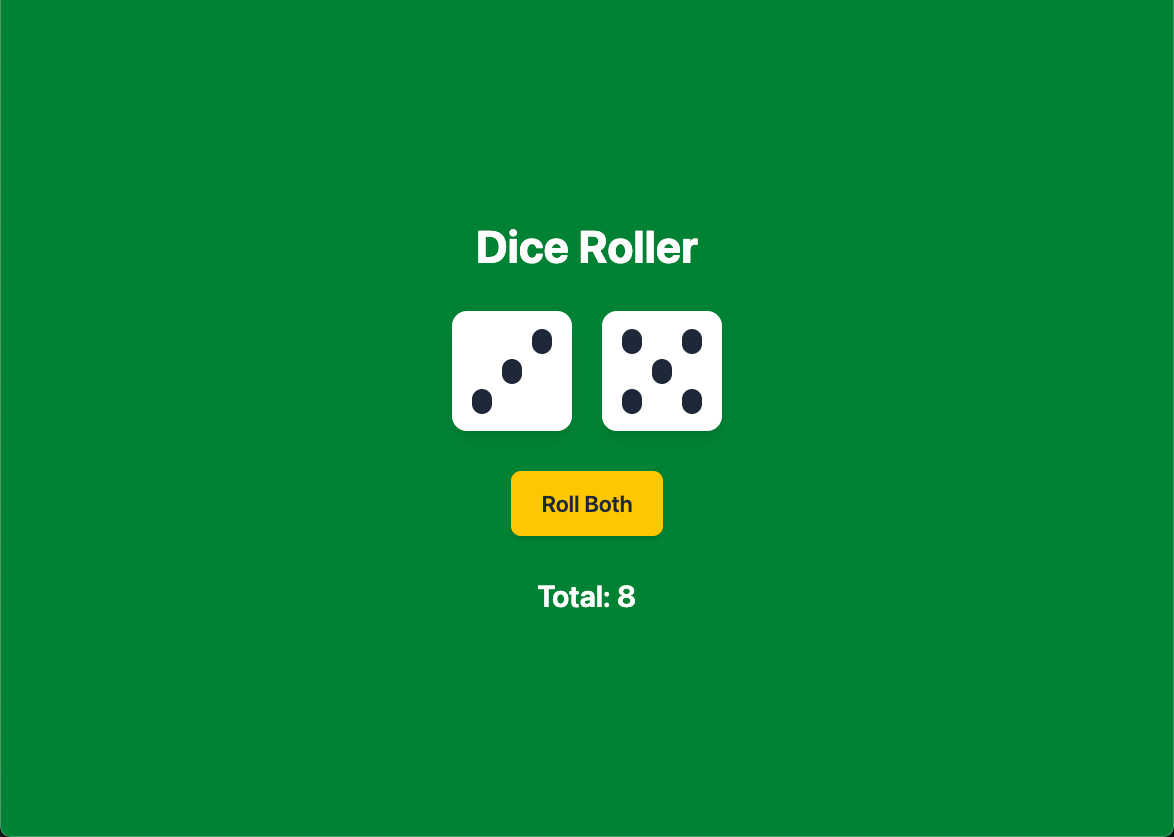
Run the app and verify:
- Clicking a die rolls only that die
- Clicking “Roll Both” rolls both dice at the same time
- The total updates correctly after every roll
You will see this same lifting-state-up pattern in later tutorials. A parent component holds state, passes it down to children, and receives changes through callbacks. The pattern does not change as the UI gets bigger.
Checkpoint: Commit your progress.
git add .
git commit -m "dice-06: Lift state up for shared dice control"
git push