Search with a Full-Text Search Index
Our client-side search only filters projects that have already been loaded. To search the full dataset, we need to move the search to the backend.
Filters and Regular Indexes Do Not Support Text Search
Your first thought might be to use Convex’s .filter() on the query, or add a regular index on the name field.
Neither works for text search. Convex’s .filter() only supports comparisons: eq, neq, lt, gt. There is no “contains” or “includes” operator. You can check if a name equals “Mobile App Launch”, but you cannot check if it contains “mobile”. Same goes for regular indexes with .withIndex() — they match exact values or ranges, not substrings.
There is also a quality issue. If a user searches for “mobile launch”, they expect to find “Mobile App Launch”, even though “mobile launch” is not an exact substring. That requires word-level matching, case insensitivity, and prefix matching (typing “mob” should match “Mobile”). None of that is possible with equality filters or regular indexes.
Convex has a separate feature for this, called a search index.
Define a Search Index
A search index is different from a regular index. Instead of sorting by exact values, it tokenizes text (breaks it into words) and builds a lookup structure. Searching for “mobile launch” matches any document whose name contains both “mobile” and “launch” as words, regardless of order. Typing “mob” matches “Mobile App Launch” thanks to prefix matching.
Update convex/schema.ts to add a search index on the projects table:
  projects: defineTable({
    name: v.string(),
    description: v.optional(v.string()),
    deletedAt: v.optional(v.number()),
- }).index("by_deletedAt", ["deletedAt"]),
+ })
+   .index("by_deletedAt", ["deletedAt"])
+   .searchIndex("search_name", {
+     searchField: "name",
+     filterFields: ["deletedAt"],
+   }),
searchField: "name"— the field to search in. Each search index has exactly one search field, and it must be a string.filterFields: ["deletedAt"]— fields that can be used as equality filters alongside the search. We includedeletedAtso the search excludes soft-deleted projects.
Update the List Query
We will add an optional search parameter to our existing list query. When a search term is provided, the query uses the search index. Otherwise, it does the normal paginated listing.
Update the list query in convex/projects.ts:
export const list = query({
  args: {
    paginationOpts: paginationOptsValidator,
    search: v.optional(v.string()),
  },
  handler: async (ctx, args) => {
    if (args.search) {
      return await ctx.db
        .query("projects")
        .withSearchIndex("search_name", (q) =>
          q.search("name", args.search!).eq("deletedAt", undefined),
        )
        .paginate(args.paginationOpts);
    }

    return await ctx.db
      .query("projects")
      .withIndex("by_deletedAt", (q) => q.eq("deletedAt", undefined))
      .order("desc")
      .paginate(args.paginationOpts);
  },
});
The search branch uses the search index for text matching and the .eq("deletedAt", undefined) inside the search index callback filters out soft-deleted projects. The non-search branch uses the regular index as before.
Update the Frontend
Now update src/routes/index.tsx to pass the search query to the backend instead of filtering on the client. Replace the existing code with:
import { useState } from "react";
import { createFileRoute } from "@tanstack/react-router";
import { usePaginatedQuery } from "convex/react";
import { api } from "../../convex/_generated/api";
import ProjectCard from "@/components/project-card";
import ProjectSearch from "@/components/project-search";
import CreateProjectDialog from "@/components/create-project-dialog";
import { Button } from "@/components/ui/button";

export const Route = createFileRoute("/")({
  component: ProjectListPage,
});

function ProjectListPage() {
  const [searchQuery, setSearchQuery] = useState("");

  const { results, status, loadMore } = usePaginatedQuery(
    api.projects.list,
    searchQuery.trim() ? { search: searchQuery.trim() } : {},
    { initialNumItems: 6 },
  );

  return (
    <div>
      <div className="mb-6 flex items-center justify-between">
        <h2 className="text-xl font-semibold">Projects</h2>
        <div className="flex items-center gap-2">
          <ProjectSearch value={searchQuery} onChange={setSearchQuery} />
          <CreateProjectDialog />
        </div>
      </div>
      {status === "LoadingFirstPage" ? (
        <p className="text-muted-foreground">Loading projects...</p>
      ) : results.length === 0 ? (
        <p className="py-12 text-center text-muted-foreground">
          {searchQuery.trim()
            ? "No matching projects found"
            : "No projects yet. Create one to get started!"}
        </p>
      ) : (
        <>
          <div className="grid grid-cols-1 gap-4 sm:grid-cols-2 lg:grid-cols-3">
            {results.map((project) => (
              <ProjectCard key={project._id} project={project} />
            ))}
          </div>
          {status === "CanLoadMore" && (
            <div className="mt-6 flex justify-center">
              <Button variant="outline" onClick={() => loadMore(6)}>
                Load More
              </Button>
            </div>
          )}
          {status === "LoadingMore" && (
            <p className="mt-6 text-center text-sm text-muted-foreground">
              Loading more...
            </p>
          )}
        </>
      )}
    </div>
  );
}
The key change is in the usePaginatedQuery call:
const { results, status, loadMore } = usePaginatedQuery(
  api.projects.list,
  searchQuery.trim() ? { search: searchQuery.trim() } : {},
  { initialNumItems: 6 },
);
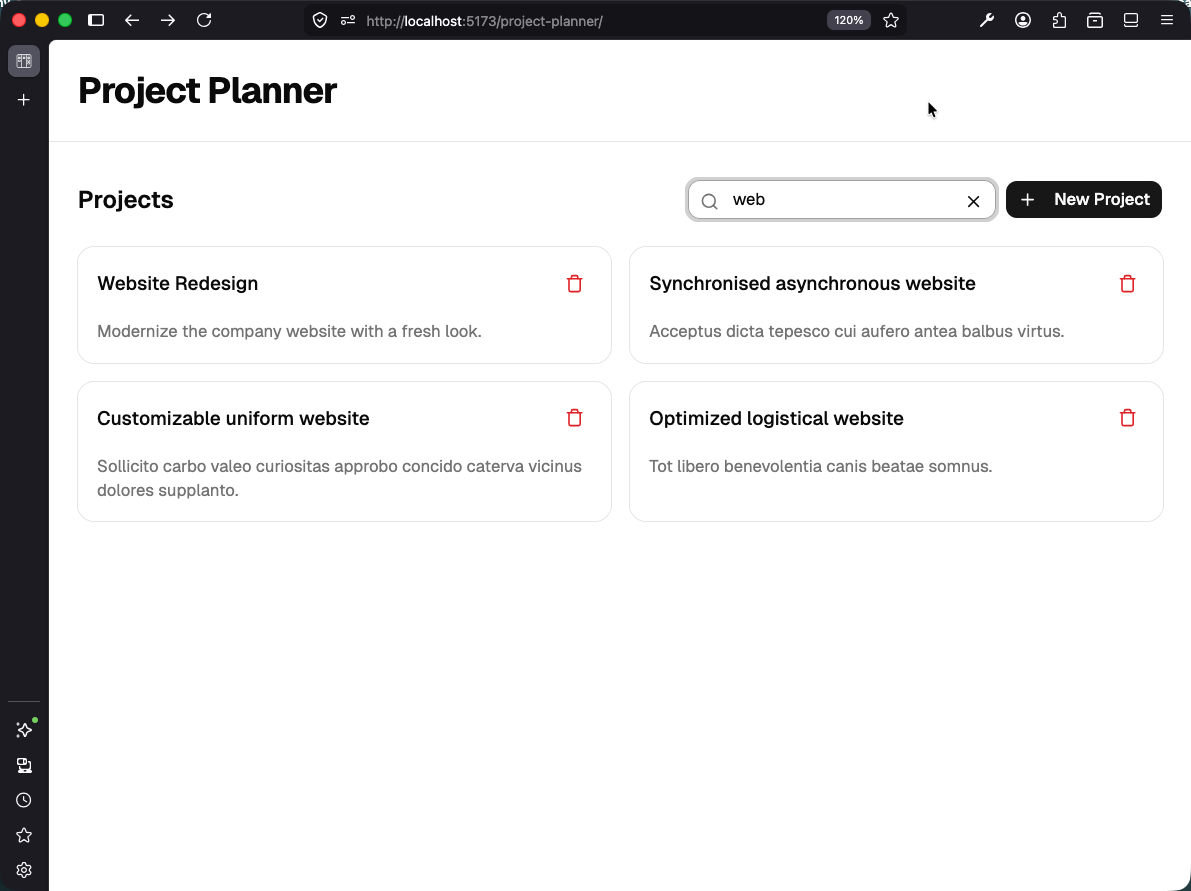
When the search bar has text, we pass { search: "..." } as the query argument. When it is empty, we pass {} — no search, normal listing. The same usePaginatedQuery hook handles both cases, and the “Load More” button works whether you are browsing or searching.
The client-side .filter() is removed. The search now happens on the server against the full dataset, so results are not missed because of unloaded pages.
Checkpoint: Commit your progress.
git add .
git commit -m "planner-17: Move search to backend with full-text search index"
git push